Category: Development (Page 4 of 5)

What to do with your ADX Studio Portal once Microsoft supports ends?

I’ve had several queries from my colleagues in the past couple of months about what they should do about their legacy ADX Studio Portal once official support ends.  So decided to summarise all the relevant options and facts surround this in a single blog post and capture it for future reference if others want to understand this further.  Most of the information you see here is presented in greater detail on Adoxio and Microsoft’s own websites (links are included below).  This will be a (very) quick summary with my analysis and interpretation of the options.

In September 2015 Microsoft announced the acquisition of the Adoxio Inc, the makers of ADX Studio Portals for Dynamics CRM and 365.  Break fix support continued to be supported by Microsoft.

However, as of August 1st 2018, Microsoft support for what is known as legacy ADX Studio Portal will be coming to an end.

Continue reading

PowerApps SharePoint Upload Control – Walkthrough

The SharePoint Upload control was recently introduced to PowerApps, and I want to give a short demonstration of how it can be used. Firstly a little more information about the upload control.

The upload control has the following properties:

  • 10MB File Size restriction
  • Specific event triggers : OnAttach, OnRemove, OnSelect
  • Must be embedded on a form for it to be enabled.
  • Currently only works with SharePoint Lists with other upload data sources being made incrementally available in the future
  • iOS devices can only upload from document and cloud storage accounts (if you have photos you want to upload, it’s best to use the camera control instead).

Here are the steps to get started with Upload Controls:

  1. Create an App with SharePoint as your data source.

Screen Clipping

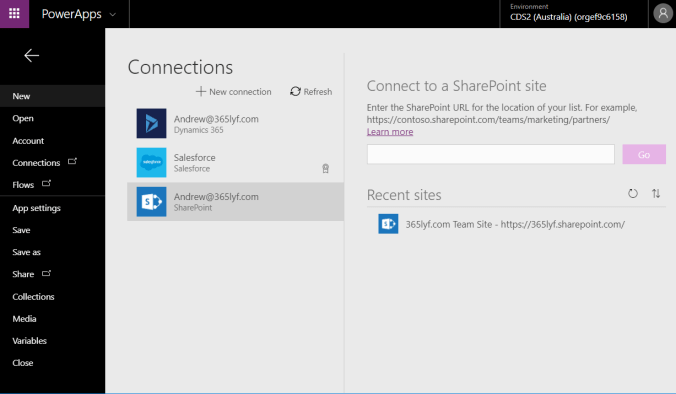
  1. Connect to a SharePoint Site and choose a list.

Screen Clipping

  1. The Canvas app has included the scaffolding for a vertical layout application complete with a list view of your SharePoint List, as well as a + button to add new records. Double Click on this + button.

Screen Clipping

  1. Click on the Form (hint: click on white space under all your fields) then click on Data

Screen Clipping

  1. Add the Attachments Attribute to the Fields list within the Data Source Window.

Screen Clipping

  1. Preview your app by pressing F5 or the Play button. Try uploading a file and click Save.

Screen Clipping

  1. (Optional) Now you probably want to preview your attached image against the record. Double click on the View Item Detail screen (hint: > button on the main list form).
    1. Click on the main form (hint again: > white space under your fields)
    2. Click on your Data (hint: right hand panel)
    3. Add Attachments field.
      Screen Clipping
    4. Now F5 to preview.
      Screen Clipping
    5. Clicking your attachments will allow you to download the file.

So as you can see it’s pretty simple to use, and works exactly as described. I look forward to further improvements to the upload control from Microsoft. If you have any feedback about this control, or something didn’t go exactly as you expected deploying your control, please do drop me a comment below and I will try to get back to you as soon as possible.

Additional Resources:

PowerApps (Spring Release 2018) Overview

PowerApps has certainly come a long way, and no doubt the innovation and investment in the latest release will change the way businesses operate in the future.   This is a major update, and there is a lot to get your head around – so I decided to give a detailed summary of the changes in the latest release of PowerApps (Spring Release 2018) in the form of a short 10 minute video.

If you have any questions on PowerApps, please do comment below and i’ll endeavour to come back to you with some answers.

D365 V9.0 – A Feature a Day – Admin API

Today we continue with the blog series D365 V9.0 – A Feature a Day, and I am enjoying the self-discovery process of all the new improvements that have been made to the V9.0 platform. Today’s feature will be focusing on the new Admin API.

What is it?

The Dynamics 365 Customer Engagement Admin API allows you to perform administration functions that normally have been associated with the Dynamics 365 Administration Center through the Admin API Web Service.

Screen Clipping

Continue reading

D365 V9.0 – A Feature a Day – Virtual Entities in V9.0 (Integration Made Easy)

Today we continue with the blog series D365 V9.0 – A Feature a Day, and I am enjoying the self-discovery process of all the new improvements that have been made to the V9.0 platform. Today’s feature will be focusing on the newly introduced Virtual Entities.

Today’s Feature – Virtual Entities

Previously the options for integrating external data sources into your Dynamics solution were limited usually involving persisting external data within your organisation database or developing client side script to pull on demand.

Today, Microsoft Dynamics 365 V9.0 offers a new way of integrating external data in a friendly manner – introducing Virtual Entities.

Virtual Entities behave similarly to regular entities but instead sources its data from external sources.

Continue reading

D365 V9.0 – A Feature a Day – Auto Numbering in V9.0

Today we continue with the blog series D365 V9.0 – A Feature a Day, and I am enjoying the self-discovery process of all the new improvements that have been made to the V9.0 platform. Today’s feature will be focusing on the newly introduced AutoNumber.

Today’s Feature – Auto Numbering in V9.0

Native auto number is finally here! First previewed by Matt Barbour in the Microsoft Dynamics 365 CE Update for Developers presentation, what do we need to know about this new attribute type?

Continue reading

3D Models within Dynamics 365

Today’s VBlog is about how to embed 3D Models directly into Dynamics 365 forms.  I look forward to putting together a full write up soon.

In the meanwhile, if you like the video please subscribe to my new YouTube channel, and share on your networks.  Hope you enjoy!

« Older posts Newer posts »

© 2026 365lyf.com

Theme by Anders NorenUp ↑