Page 8 of 11

How to change Resolution Type status labels in Dynamics Cases

This troubleshooting blog post was written in response to a question on the community forum on how to change the resolution type label for cases.

When you click on Resolve Case you will see a pop up. With the options to change the Resolution Type to either Problem Solved or Information Provided.
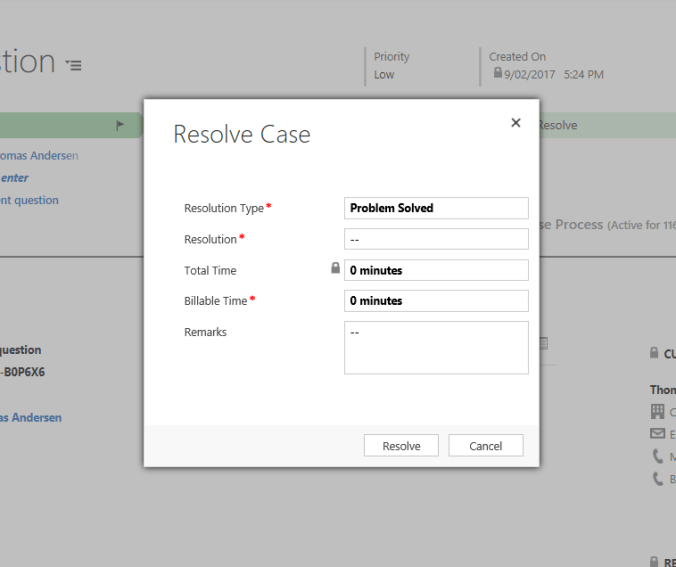
To change this, goto Settings > Customize the System. Then navigate to Entities > Cases.

Click on Fields and Locate “Status Reason”.

Edit the Status Reason (StatusCode) attribute.

Change the Status dropdown from Active to Resolved

Edit the Label for “Problem Solved” and change this to a value of your choosing, in this case “Resolved”.

Click OK.

Click Save and Close. Then Publish All Customizations.

Now when you resolve a case you should see the new value reflected on the pop up dialog.

[Adelaide D365 User Group] Azure Bot Framework – June 28th

Hi All

Have you heard of DRU Assist from Domino’s, where you can order your pizza with an emoji via SMS? Or you may even use the ABC News Bot through Facebook to get your daily news digest. Bots are even making micro-trades on the stock market whilst we’re all fast asleep, scary right?

Bots are not new, but they are becoming more powerful, pervasive and acceptable in today’s society as a way to get answers, access information, buy goods and book services.

Join us at the June Dynamics 365 User Group where Sam Fernando will step us through the basics of the Microsoft Azure Bot Framework. More importantly, we’ll show how to connect the bot back into Dynamics for try end-to-end digital services.

Please register here so we know numbers and can place our order via the Funk CoffeeBot (we wish!).

cid:image001.png@01D2DA17.DD6459D0

Connected Field Services – May Dynamics 365 ADELAIDE User Group

Hi There

Imagine you run a café and one of your coffee machines is about to fail, but you have no idea. You get a call from your supplier who monitors the machines and informs you that not only is the machine at risk of imminent failure, but has been performing below-par for a few days. They offer to service the machine and you’re able to schedule a service call on the spot, within a 2 hour window of your choosing. A day before, you receive an SMS reminding you of the service call. On the day, you receive another SMS when the technician is on their way. On arrival, the technician has all the details and spare parts they need, performs the service quickly and even has time to demonstrate optimal configuration of the machine to prolong its life. You electronically sign off the work, and receive an invoice via email by COB that day.

This story describes Connected Field Services; a world where IoT sensors, cloud, big data, predictive analytics, CRM and mobile come together to create amazing customer experiences.

Please join us at the May Dynamics 365 User Group where Mark Giles from Empired will demo connected field services. And he’ll even test is relationship with the ‘demo gods’ by showing something live.

Please click here to register and we hope to see you there.

MB2-715 customer engagement Online Deployment study tips by 365lyf (Andrew Ly)

Today’s blog is about preparation tips for the MB2-715 customer engagement Online Deployment certification exam.  I wanted to share my thoughts and study preparation tips with you as I know at this time many of you are looking to attain your MCSA or MCSE:BA Dynamics 365 badge for which this exam is a mandatory requirement.

I provide this information with no warranties of course, and nothing within this blog post will contain questions or answers so as to not violate our NDA with Microsoft.

So here we go..

Continue reading

How to Use Dynamics Optionset Labels within PowerBI


One of the current limitations of using PowerBI with Dynamics 365, is that it will not automatically map your OptionSet values with labels. For example if you have defined OptionSet values for Gender as 1 = Male, 2 = Female within PowerBI visualisations this would appear as 1 and 2 rather than Male and Female. Thankfully Gap Consulting have created a nice XrmToolBox plugin called the “PowerBI Option-Set Assistant” to work around this limitation.

Continue reading

Studying for the MB2-716 Exam (Dynamics 365 Customization and Configuration)

Hi all,

I recently passed my MB2-716 Dynamics 365 Customization and Configuration exam, and thought I would share my study notes in the hope this would be helpful for you.  This post will focus on the Microsoft Learning along with the key differences you should note if you have already taken the previous MB2-712 (Dynamics CRM 2016 Customization and Configuration) exam.  I will provide some links to Microsoft learning resources, but will not provide specific questions or answers as per NDA, just some of my learnings throughout the process.

Continue reading

D365 User Group – April 26th – CRM Portals

Hi All

Digital engagement is facilitated by integrating your online presence with your back-end systems. This is sometimes only achieved through building complex and costly integrations and API’s. But what if your website or portal was natively integrated with Dynamics 365? What if the hard work was done for you?

Well, that’s what Dynamics 365 Portals is – an integrated portal platform that plugs directly into Dynamics 365 to facilitate digital engagement with your customers, partners, suppliers and even employees.

This month’s User Group will provide an introduction to Dynamics 365 Portals, and show you just how easy it is to get started quickly on this incredibly versatile platform.

Please register via the following link: https://www.meetup.com/AdeD365UG/events/238074474/

We hope to see you there!

Embed PowerBI Reports into Microsoft Portal

Microsoft make it incredibly easy to create and share content, including content from PowerBI onto other platforms. PowerBI is a powerful business analytics service that comes with a host of features to present data and visualisations to all your stakeholders, both inside your network and in this case outside your network. Today we will be looking at the Publish to Web feature within PowerBI.

Continue reading

« Older posts Newer posts »

© 2026 365lyf.com

Theme by Anders NorenUp ↑